demiurge777

peter meier
Member
Hi all,

Working to create a Tool to extract Multi.idx and mul from MultiCollection.uop (7.0.113.0)
already got the files out.

Import into fiddler (4.12.10) works.
In Fiddler you can edit the files and import uoa (architect) files in the mul.
Saving in fiddler works.
Working to get the strange invisibles right and working on the export to uop again.

if anyone knows about latest uop/mul conversion or knows how to repack the files into uop... any help is apreciated
1773342726578.png

1773342752785.png

1773342774105.png
1773342936285.png

1773342967200.png
so...
creation of file in UOArchitect works with UOA export.
extraction of mul/idx works
import of UOA in fiddler to new mul/idx works
export from fiddler to mul/idx works
just have to get the mul/idx to ups going
 
Last edited:
OK...
I got that fixed....

Sideloading unknown indices at export
Export housing.bin

converting to old .mul & .idx (pre high-seas)
that makes all editable in fiddler.
1773407559594.png

at import: convert back to post high-seas format
packing it all back into modern uop format (bin, sideloads, mul and idx)

copied multicollection.uop into uo-client-dir.
Opened CentrEdNet and got the multies in the tool to dump them on the map by draw blueprint.
1773407591107.png

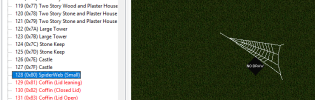
edit the Multi.mul.txt in Centred folder and give it the entry of your new blueprint, otherwise it will say "unknown"
1773407813108.png

Entry in Multi.mul.txt (0x80 = 128 dec)
1773407929610.png

Voila....
1773407988506.png
since i worked in c# dotnet 10.4(preview) i had to include the framework, now the rar is 35meg (unpacked +100megs) cant upload here.
 
Last edited:
its a dotnet10 app... in case you have to install
1773427648128.png
Step 1: Create UOP-Path and MUL | IDX Patch directories & set your directories.
Step 2: Copy MultiCollection.uop and TileData.mul to your UOP-Path directory.

Step 3: Hit Create Multi.mul/idx/dif/bin/json

Multi.mul and Multi.idx are created along housing.bin and some needed sidecar files to handle unknown entries and are stored in your Mul | IDX dir..

Step 4: Copy Multi.mul and Multi.idx to your UOFiddler work directory or point fiddler to your Mul | IDX dir...

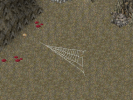
Step 5: Create new multi entries in UOFiddler of your uoarchitect work or make some useful multies of ingame coffins, spiderwebs

Step 6: Save Multi.mul and Multi.idx in UO Fiddler.

Step 7: Copy Multi.mul and Multi.idx from your fiddler work dir to MUL | IDX Patch directory or set the save dir in fiddler to your Mul | IDX dir...

MAKE A COPY OF YOUR ORIGINAL MultiCollection.uop


1773427689980.png
Step 8: Hit Create MultiCollection.uop

In your UOP-Path there will be the new MultiCollection.uop.

You can now copy the UOP in your UO Client Folder, start CentrEDNet and have your new Blueprints in the App to dump them on your map.
 

Attachments

Last edited:
I'll have to give this a tinker, Thank you. UoFiddler likes to crash when I do much with the packed files, especially multis. I ended up extracting everything from uop, exporting, and re-importing into the legacy mul files. Not fun.

Since you mentioned invisible things, what did you figure out? Also, are you manually naming the multis that don't have names by default or does that information exist somewhere else?
 
Where is your housing.bin extraction and importing of it during multicollection.uop operations? there is one extra file inside of that uop file that requires special handling.
I'll have to give this a tinker, Thank you. UoFiddler likes to crash when I do much with the packed files, especially multis. I ended up extracting everything from uop, exporting, and re-importing into the legacy mul files. Not fun.

Since you mentioned invisible things, what did you figure out? Also, are you manually naming the multis that don't have names by default or does that information exist somewhere else?
Which uofiddler exactly? The one on screenshots above is a fork made by jedi 🙂 I haven't got any reports about multis crashing so what exactly are you saying here?
 
I'm using the one from PolServer https://github.com/plserver/UOFiddler

I clicked on an index in a multi that was seemingly corrupt but not empty (Not hidden) and it would immediately crash. They've since had a few updates in the past few weeks and it seems like they fixed that issue. The latest version (4.19.0) has a tab for multi.mul and MultiCollection.uop, so you can see/edit both.

1777073654268.png

The older version only displayed multi.mul. To view MultiCollection.uop I extracted it and used multi-unpacked.idx/multi-unpacked.mul instead of multi.idx/multi.mul. I watched a video on YouTube about UOFiddler that mentioned that the packed multi file doesn't have holes and unpacking it makes a mul without them, but no content for the non-holes. If that makes sense?

The crash below is after clicking on index 5286 (0x14A6) in version 4.17.9. The latest version still generates an exception, but doesn't get the red X that never goes away. Continuing lets the application continue to function.

But the prior crashes that I had are a non-issue with the PolServer version anyway since it directly handles uop files now. I don't have to extract uop and overwrite the legacy mul/idx files. That being said, I'm still interested in seeing how your project comes along. Perhaps the extraction doesn't have the issue with holes.

1777073483797.png
 
Last edited:
I don't have index 5286 in latest uo client version... could you send me your multi.mul idx? It's probably modified multi with some invalid data in it. Or is this unpacked multicollection.uop?
 

Donations

Total amount
$50.00
Goal
$500.00

Shards

Back