You are using an out of date browser. It may not display this or other websites correctly.
You should upgrade or use an alternative browser.
You should upgrade or use an alternative browser.


Installer is dead as servers hosting files are no longer available. Use packed version and update your registry: Maps - CentrED+ UploadDoes anybody know where I could find a working installer for centred+ now that these links are dead?

BeardFish
Initiate
Hey!
Does anybody know how to import Multis to Centred+? I've seen a lot of videos of users having a list of "premade" buildings in their tiles selection list that they could simply place on the map and I was wondering if there is any tutorial out there on how to do that. All I have in my list are the grouped brushes (dirt, grass, snow, etc.).
Does anybody know how to import Multis to Centred+? I've seen a lot of videos of users having a list of "premade" buildings in their tiles selection list that they could simply place on the map and I was wondering if there is any tutorial out there on how to do that. All I have in my list are the grouped brushes (dirt, grass, snow, etc.).
in left sidebar there is splitter you can moveHey!
Does anybody know how to import Multis to Centred+? I've seen a lot of videos of users having a list of "premade" buildings in their tiles selection list that they could simply place on the map and I was wondering if there is any tutorial out there on how to do that. All I have in my list are the grouped brushes (dirt, grass, snow, etc.).
 and those items are defined in xml files so you have to put every tile of the "multi"to build an object 🙂
Check TilesGroup and TilesEntry files to see how its done. If the tile ids are not avaialble in your client and are present as entries in files your ced+ client may and probably will crash.

Greenleafdude
Initiate
All links are broken, I can't download centred...
But maybe someone could upload and share the link?
I'm using client version 5.9.0.1, could anyone help me make everything work please?
Thanks!
But maybe someone could upload and share the link?
I'm using client version 5.9.0.1, could anyone help me make everything work please?
Thanks!
Works just fine https://www.servuo.dev/archive/centred.187/All links are broken, I can't download centred...
But maybe someone could upload and share the link?
I'm using client version 5.9.0.1, could anyone help me make everything work please?
Thanks!
Greenleafdude
Initiate
Thank you AsYlum! ^^Works just fine https://www.servuo.dev/archive/centred.187/
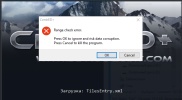
Rename your TilesEntry.xml to something else like xTilesEntry.xml or update contents of the file to match your client's contents.

which links? The original domain for ced+ expired some time ago.I don't know if this was intentional, but the links are full of Malware.
Hold up - this site is malicious,
Great Developer ...Bad Intentions ? it really ruins your day to load it with spyware so use a VM server to develop and browse with.

Yeah the download is loaded with Malware, any safer sites hosting?

StaticZ returned a year or so ago and uploaded it to the resources section instead, with the following explanation:
I would download from here and not trust the uoquint.ru domain name in the meantime.
StaticZ said:As used previous external host become unavailable, I update installer and upload it again.
I would download from here and not trust the uoquint.ru domain name in the meantime.
Last edited:
thank you!StaticZ returned a year or so ago and uploaded it to the resources section instead, with the following explanation:
I would download from here and not trust the uoquint.ru domain name in the meantime.
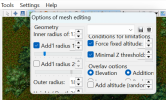
turn off text scaling in windows 🙂 ced and ced+ doesn't like high dpi settings.does anyone know how to fix the size of the menus that pop up for each tool? I've tried changing display resolutions, but nothing seems to make a difference.
View attachment 25886
in Display settings make sure it's set to 100% .


Buddha
Member
tried that earlier and it didn't work.. turns out you have to close out of CED+ and reopen it for it to take effect! tyvm!turn off text scaling in windows 🙂 ced and ced+ doesn't like high dpi settings.
in Display settings make sure it's set to 100%
yes, app needs to be restarted. Especially if it's the old app 🙂tried that earlier and it didn't work.. turns out you have to close out of CED+ and reopen it for it to take effect! tyvm!

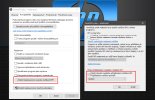
This is one method to do it. But I personally do not recommend it.The second is that you directly set the program how it should behave.Right-click on the program CentrED-plus.exe. A menu will open and select Properties. In the Compatibility tab, click as shown in the picture ... I have it in Czech, so I do not know how it looks in English. But it will be intuitive. Click on the highlighted button. Another window will open and there you set what is in the second menu picture. And then everything will work fine in cenrEd.