OP


search for the file name and you will find that it is located at \Scripts\Customs\XmlSpawner\XML Attachments\I need an answer. Thanks.


search for the file name and you will find that it is located at \Scripts\Customs\XmlSpawner\XML Attachments\I need an answer. Thanks.

Of course!Did you set up Serverpath.cfg correctly? thats the issue most people have
View attachment 27554
This update adds the Shards of Minax dashboard. use the [dashboard command
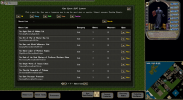 The next version will have a much upgraded quest and NPC system. There are now epic 8 part quests for every town and faction in the game! These quests will introduce you to the town or faction and gain you valuable starting reputation. In addition the Ultimate Skill Masters have been replaced with unique quest lines for each skill. Each of the 57 skills has its own unique 8 part quest line where you will gain power scrolls for the skill from 75 all the way up to 200!
The next update will be pretty big. I just got a fancy new AI tool and I am basically rewriting everything from the ground up. Lots of old systems that need updating. Likely a few monthsThank you for your dedication to the project. When is the next update scheduled for?
Looking forward to your updatesThe next update will be pretty big. I just got a fancy new AI tool and I am basically rewriting everything from the ground up. Lots of old systems that need updating. Likely a few months
Looking forward to your new version, and thank you for your hard work.The next update will be pretty big. I just got a fancy new AI tool and I am basically rewriting everything from the ground up. Lots of old systems that need updating. Likely a few months
View attachment 27656
Shards of Minax Development Update: A Wilder, Smarter, More Dangerous World
Development on Shards of Minax has been moving fast, and the shard has taken a major step forward in making the world feel alive, dangerous, reactive, and full of strange personalities. Over the last round of work, we focused heavily on wilderness activity, advanced monster behavior, richer NPC interaction, new creature variety, and...
Okay, I see.i am never updating the base servUO I have changed too many scripts

I am seeing the same thing. Typing Y to delete it, then Y to delete all instances throws the fatal exception and closes the server.Hello,
I need help, please! Can't start server.
I unzipped "Shards_of_Minaxv095" using WinRar.
I change path in datapath.cfg to c:\Shards_of_Minax.
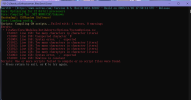
I run "ServUO.exe" as administrator and get the following messages:
"
[VitaNexCore]:
[VitaNexCore]: Compile action started...
[VitaNexCore]: Compiling Services...
[VitaNexCore]: Compiling Modules...
[VitaNexCore]: Compile action completed in 0.01 seconds
[VitaNexCore]:
[VitaNexCore]: Configure action started...
[VitaNexCore]: Configuring Services...
[VitaNexCore]: Warning: Conflicting Alias ID: 1217873814
Server.Mobiles.SacredHart <> Server.Mobiles.SacredHart
[VitaNexCore]: Configuring Modules...
[VitaNexCore]: Configure action completed in 0.49 seconds
[VitaNexCore]: System.NullReferenceException: Object reference not set to an instance of an object.
at System.ObjectExtUtility.GetEventDelegates(Object obj, String eventName)
at VitaNex.VitaNexCore.Configure()
Regions: Loading...Could not parse Server.MusicName enum attribute 'name' in element 'music'
Could not parse Server.MusicName enum attribute 'name' in element 'music'
done
World: Loading...
An error was encountered while loading a saved object
- Type: Server.Mobiles.ThunderBird
- Serial: 0x00000576
Delete the object? (y/n)
"
Typing y or n will get:
"
After pressing return an exception will be thrown and the server will terminate.
Error:
System.Exception: Load failed (items=False, mobiles=True, guilds=False, data=False, type=Server.Mobiles.ThunderBird, serial=0x00000576) ---> System.Exception: ***** Bad serialize on Server.Mobiles.ThunderBird *****
at Server.World.Load()
--- End of inner exception stack trace ---
at Server.World.Load()
at Server.Core.Main(String[] args)
This exception is fatal, press return to exit
"
I'm running Windows 10 on AMD Ryzen 5600 with 16GB RAM.
Question answered in Discord. I had the datapath.cfg file set incorrectly. Changed it to point to C:\Shards_of_Minax\Client_Files and all works correctly. (was missing the \Client_Files)I am seeing the same thing. Typing Y to delete it, then Y to delete all instances throws the fatal exception and closes the server.
Restarting the server then gets to World: Loading... and produces pages and pages of "Failed to load..." errors similar to the following:
Examples:
[XmlNpc] Failed to load 'LadyFibonacci': System.TypeInitializationException: The type initializer for 'Server.TileData' threw an exception. ---> System.Exception: TileData: not found
at Server.TileData..cctor()
--- End of inner exception stack trace ---
at Server.TileData.get_ItemTable()
at Server.Item.get_ItemData()
at Server.Item.UpdateLight()
at Server.Items.Backpack..ctor()
at Server.Mobiles.DialogueNpcApplier.NormalizeBackpack(BaseCreature bc)
at Server.Mobiles.DialogueNpcApplier.Apply(BaseCreature bc, DialogueNpcDefinition def)
at Server.Mobiles.XmlNpc.LoadAndApply(String key)
[FalloutDialogueNpc] Failed to load 'PipAshwing': System.TypeInitializationException: The type initializer for 'Server.TileData' threw an exception. ---> System.Exception: TileData: not found
at Server.TileData..cctor()
--- End of inner exception stack trace ---
at Server.TileData.get_ItemTable()
at Server.Item.get_ItemData()
at Server.Item.UpdateLight()
at Server.Items.Backpack..ctor()
at Server.Mobiles.DialogueNpcApplier.NormalizeBackpack(BaseCreature bc)
at Server.Mobiles.DialogueNpcApplier.Apply(BaseCreature bc, DialogueNpcDefinition def)
at Server.Mobiles.FalloutDialogueNpc.LoadAndApply(String key)
Any info would be helpful.


someone can help me? View attachment 27822
Question answered in Discord. I had the datapath.cfg file set incorrectly. Changed it to point to C:\Shards_of_Minax\Client_Files and all works correctly. (was missing the \Client_Files)
-Many bug fixes thanks to MiraLinia and others. See the discord for full list.
-Quest NPCs no longer spawn in the oceans
-Advanced wilderness monsters no longer appear in Trammel. It is a more vanilla experience for starting your character.
-SimPCs optional system
Unfortunately new versions usually break old saves. So if you want to update you should keep a backup of your old world toohow do i update? i don't wanna break anything
in \TazUO Custom\Data\UI open the file ClassicUO.Game.UI.Gumps.StatusGumpModern.json and changed the lineI Still have the issue about the status gump misaligned.
As you can tell by now, I'm not good with TazUO but seems that is no using the custom resources. For example it don't seems to use the "modern-paperdollgump.png" anywhere... so I'm thinking that: am I missing some step to instruct TazUO how to use custom resources? is it not enough to copy the custom content inside the TazUO client folder?
Thank you again to everyone 🙂

We use essential cookies to make this site work, and optional cookies to enhance your experience.
![[TazUO 3.24.3.0] - 2026-04-03 01_24_31.png](https://www.servuo.dev/data/attachments/27/27595-b4aa1bad98f19962af53e7d6ea496b70.jpg?hash=-WR82T1hn9 "[TazUO 3.24.3.0] - 2026-04-03 01_24_31.png")